Nano has already supplanted the great EMacs and Vim as the most popular text editor of all linux distros, for though it has many omissions in functionality it scores over the older, more complete programs in two important respects. First, it is slightly simpler; and secondly it has the text “^ Exit” inscribed in highlighted text on its footer
EDIT : This sees to be going over some people’s heads. It’s a hitchiker’s guide to the galaxy reference.
The Hitchhiker’s Guide has already supplanted the great Encyclopaedia Galactica as the standard repository of all knowledge and wisdom, for though it has many omissions . . . it scores over the older, more pedestrian work in two important respects. First, it is slightly cheaper; and secondly it has the words DON’T PANIC inscribed in large friendly letters on its cover.
Perhaps you’re right…or perhaps the Encyclopaedia Galactica is a better tool for navigating the galaxy if you’re willing to learn a trick or two about how to navigate it? No one ever argued that the Restaurant at the End of the Universe was the BEST restaurant, only that it was the one at the end.
Many were increasingly of the opinion that they’d all made a big mistake moving away from ‘ed’ in the first place, and some said that even ‘ed’ had been a bad move, and that no-one should ever have left punch cards.
I understand why. People tried using vi/vim but couldn’t figure out how to exit the app. On the other hand, with Emacs, you need to use 4 keystrokes to do anything. It does not surprise me why nano is way used by default.
*Ahem*
mceditunder sung hero of easy tui text editors. [Has controls on screen.]
overlooked because it’s part of mc, and thus does not show up in the text editor categories in package managers and websearches?
could do a similar THGTTG bit for it. … or other parodies of other stuff… idk, my brain not conjuring such things with ease just now.
(And yes, I missed the reference, at first, too… Thought about responding with some contrived towel elaboration).
mcedit is fine. I personally find micro the perfect blend of features and simplicity.
Nano’s used because it’s easier to use, which means the user interface is more intuitive than the others who insist you hit a key before making an edit.
Example of optimocracy
Both
nanoandemacssuffer from the same problem - bad defaults. You need to pass like ten options to nano for it to work as expected to edit configuration files and small scripts.I haven’t bothered to poke it deeply. What options do you use please? I’ll give it a go. :)
alias nano='nano -A -D -E -F -T 4 -Z -g -i -l -m -q -t -% -_'and you need to enable syntax highlighting in nanorc (not all distros enable it by default)include /usr/share/nano/*.nanorcalso there are additional/improved rules for highlighting here https://github.com/galenguyer/nano-syntax-highlighting and you can rebind every key, but it seems that it doesn’t support ‘chaining’ of keys nor multiple modifier keys at the same time.Nice, thanks!
For anyone wondering about the options: https://i.imgur.com/hAjTxJO.png
Also, apparently you can create
~/.nanorcand put the following in for those (instead of an alias):set smarthome
set boldtext
set tabstospaces
set multibuffer
set tabsize 4
set zap
set showcursor
set autoindent
set linenumbers
set mouse
set indicator
set saveonexit
set stateflags
set minibarI’ll play around with those and the syntax stuff. I definitely personally do not want the saveonexit behaviour, but you’ve started me on the path of looking at the other options, and that right there shows me it’s worth my time to look, so thank you :)
That set of options sounds basically like
micro’s behavior by default…
ed is the standard text editor
(for people missing the reference: https://www.gnu.org/fun/jokes/ed-msg.html )
I shall prematurely end this comment chain with the obligatory xkcd. Yes, you’ve seen it before, and you will see it again.
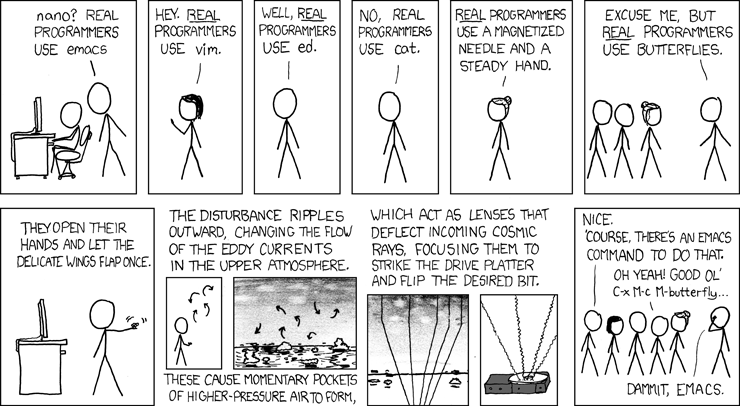
Fun fact, in emacs they added
M-x butterflyas a reference to this xkcd.i’ve been using emacs for a while and i cannot believe i’ve never thought to check for that. sure enough, there it is. amazing.
I’m ashamed to admit that, despite having read Hitchhiker’s Guide to the Galaxy several times, my Vim elitist mindset made me miss the reference.
Sometimes you need a real good slice of humble pie to remember what’s important in life.
Sometimes you need a real good slice of humble pie to remember what’s important in life.
digital watches
We should have stayed up in the trees.
They’re neat!
That’s because Ubuntu, honestly.
I use helix for all my developer work and nano for “I need to edit this config file buried somewhere in /usr/…”. I never remember to do Sudo -E
I’ve used Vim, NeoVim, Micro,
mg(1), JOE, and even MS Edit (both the original DOS version and the recent Rust clone). No matter how complex and tailored I wrote my config, though, the features I actually used were included in GNU nano and/or my command shell without any of the bugs, bloat, learning curve, or slop.Using it as my default just makes sense.
DOS edit was just an alias to qbasic /edit packaged in a .com
Nano is great for editing files. It is absolutely terrible for any amount of text processing or anything other than raw code copied from a tutorial
What sort of text processing? I rarely do this, so I usually just rely on things like
sed,ed,sort,uniq, and other shell commands to handle this.You guys do text processing on terminal editors?
was gonna say, I have IDEs and other dedicated programs for that
Of course. What do you think vim users do?
Fuck all? ;-)
Alternative joke: try to figure out how to exit
Best local simple terminal text editor is micro.
It is insane how far using the same shortcuts literally everything else can get you in the world of terminal text editors and yet here we are
oh no, not again.
Sometimes I catch myself opening nano inside emacs’ term. I literally forget I’m using emacs and just do it on instinct. I once also opened emacs inside emacs’ term and I just stared at the screen in disbelief.
Emacs: “Sure, fuck it, why not.”
We shouldn’t ask ourselfs why we should do something, but if we could do something.