Hello selhosted, First time posting here, I hope I’m not too much off topic !
I am currently working on my homeserver. I needed some more storage, but said server being a tiny Thinkcentre so I needed to get a PCIe card to connect 4+ drives to it. I went with cheap PCIe LSI SAS 3008e card instead of a PCIe to SATA3, mainly because it allowed me to get to 12GB/s and also because the external mini-SAS connector seemed more reliable and stronger than standard SATA3 cables.
I plugged everything and technically it did work great. Until I almost burnt myself while touching the card. Thermometer on the picture failed to report how hot it actually was because I could not find the right place to put the sensor, but it really did felt like it was above 100°C/212°F. Even without touching directly the radiator, I could not keep my finger anywhere on the card either.
I knew nothing about SAS cards before, needless to say I’m a bit disappointed :( And my Thinkcentre is also too narrow to let me to put a fan on the card, so now I feel like I just got myself a new paperweight haha.
Are SAS cards always running this hot? Or did I bought a bad model? Also for those like me who are running their homelab with tiny computers, how did you achieve connecting 4+ drives to it ?
Thank you for reading!
Thermometer on the picture failed to report how hot it actually was because I could not find the right place to put the sensor, but it really did felt like it was above 100°C
It may have been 60degC. Burns and sensation of temperature depend heavily on the thermal conductivity of the material you are touching, not just its actual temperature. A 100degC insulator can feel fine to keep your finger on, but a 50degC metal can burn you within a second of contact.
Does that meter really need that fourth digit?
You need to put it in a server chassis with proper cooling. These cards are designed to run in a data center.
Other option would be to swap the heatsink for something more aggressive. You might be able to do a DIY water cooling setup.
Slightly off-topic, but i have similiar issues with a SATA HDD, used for years as a thumbdrive substitute for backups, close to death (too much undertemperature).

too much undertemperature
how much is to little?
This is one of the reasons I stick with PCIe SATA cards. SAS cards run hot, use much more power, have compatibility and driver issues, and often prevent drives from spinning down. If you pick the SATA cards and ports wisely, you’ll get very similar levels of performance, much cheaper, much lower temperature, fewer issues, and lower electricity costs.

Funnily enough I just read your message while I was testing my computer power consumption with the card on (pardon the ghetto setup haha)
And yeah you’re right. Usually my computer consumes something like 8 to 12 watts an hour. It doubled with the card on, I’m idling at 20w+ now. That’s roughly 25€ more per year just to get the luxury of having my drives spinning lol.
To be honest I was thinking about getting a fan on the SAS card but there is so many inconvenients to its usage that I now wonder how bad do I really need it. Also SATA card are way cheaper to buy…
I love your ghetto setup.
I just edited my post, I’ll go with your solution :) Thanks again mate !
Most welcome :) I spend too much time and money on my home server but I love it. Best of luck.
I use a thinkcentre m720q with a 2 port 10g sfp card as my router. The card is designed for server use so it was getting pretty hot. I ordered a shroud and blower fan from here
https://store.untrustedsource.com/products/lenovo-tiny-10-25g-network-fan-shrouds
Just needed to solder on an included 5v fan header to the motherboard. The provided blower fan was a bit too loud so I added some diodes to the line to bring down the voltage. Keeps my card cool enough.
You’d have to take measurements on your card to see if there’s enough clearance
That 60 degrees is nothing! I had Solarflare cards hitting over 100 degrees C and not missing a beat. If you’re worried just zip tie a small fan to it.
OP claimed the picture was wrong and that itvwas much hotter
Yes, they get very hot, and letting them run hot reduces their lifespan dramatically. they are designed for server chassis, and will need an extra fan pointed at the heat sink if you plan to use them anywhere there isn’t abundant forced air.
I don’t have this particular model but I ended up getting a 40mm noctua and managed to mount it directly on the heating. It helped a ton.
I also have a LSI HBA and installed a noctua 40mm fan over heat sink.
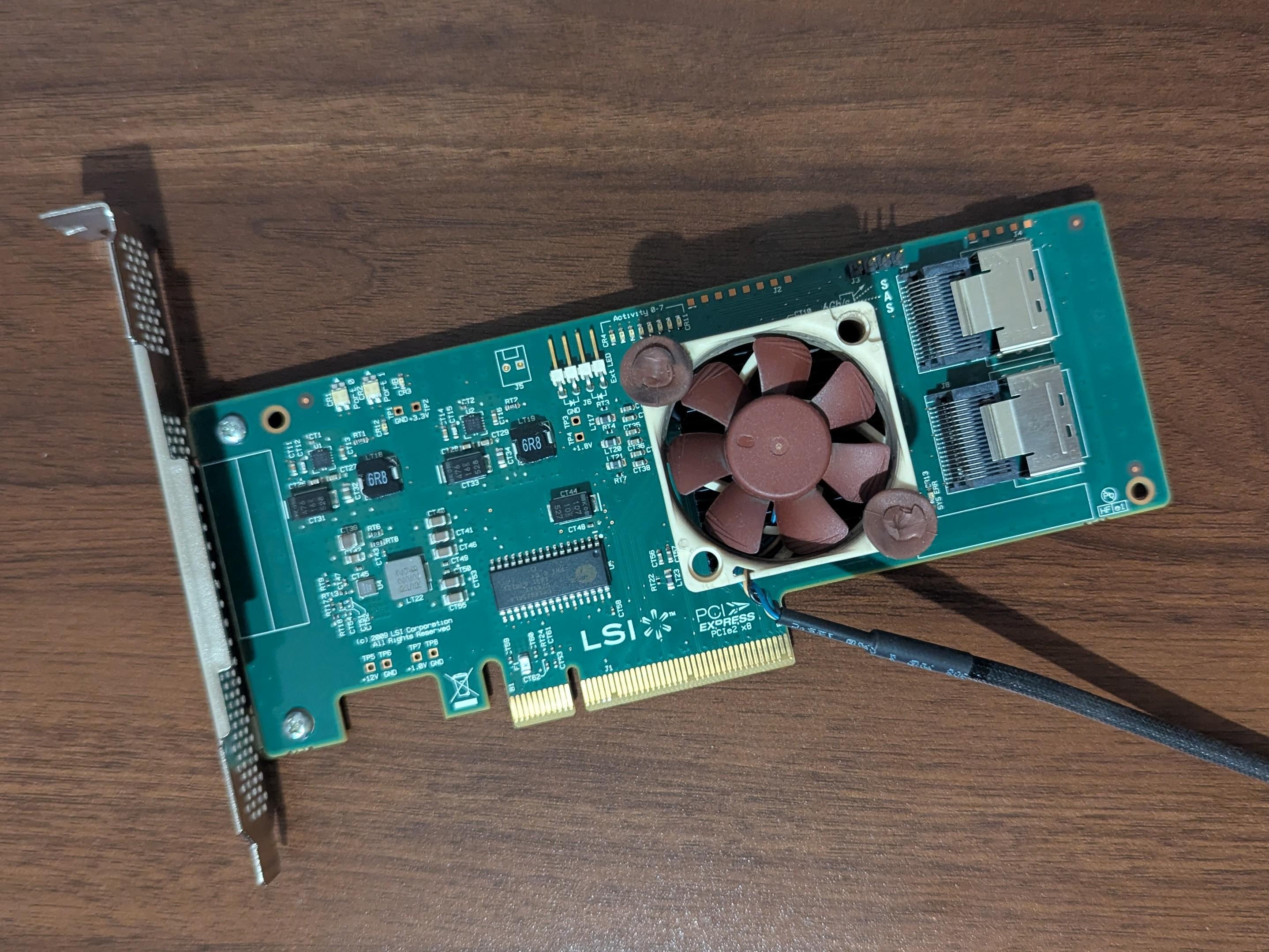
I shared it some time ago in my mastodon account 👉🏻 https://lile.cl/@carloshr/117363131083223049
I’d love to do exactly what you did, plus it does look nice. But once I close my tiny computer lid I only have 2mm of space above the radiator. But I’ll have to check if I can fit a blower fan next to the radiator instead! This might be the only solution that will work for my case haha Thanks for sharing your setup though !
I could be crazy, but I think you need to rig a fan for this thing. It’s ok to be hot, but hot things in pc’s normally need a fan.
Lookup the allowed temperature for the processor. Try to read the processor’s temperature sensor values. Some processors are just fine at 90+ °C. SAS cards are known to be energy hungry. I’m not saying it’s OK, just that it could be.
Cooling doesn’t hurt though.
Its normal that its this hot, it supposed to be in a server chassis with a lot of forced airflow. I fixed this by just zip-tying a 40x20mm noctua fan to it. You could try a blower fan on the side of the heatsink? You’ll probably have to solder a fan connector to it, though.
Hi. Yes they run this hot. Learned after putting one in my consumer desktop computer case and seeing that the drive array kept dying. I child confirm this from the available LSI software which can give you a more accurate temp readout and I wad seeing over 100°c
My solution was not to put a fan ON the card as I don’t have enough room but to put a fan in front of the card that blows towards the back of the case and cools the chip similar to how airflow would work in a server case. I tuned the fan speed to keep the card at a reasonable operating temperature, which for these cars is still kind of high. The 70s I think. I haven’t had a problem in over a year.
Thank you for your feedback this is some very valuable knowledge to me ! Since several people recommend putting a blower fan on it I’ll have to check what in can do to achieve this. 70°C is hot but this would be lore than OK compared to what I have now !
Wait… Did you use your third hand to shoot this picture!?
Not this again!
Or like, maybe there is someone else in their life capable of taking pictures?
Haha you guessed right, I asked my bf to take the picture for me
Smart glasses maybe?
Nah, I’ll never wear this kind of thing. I didn’t went self hosting to then let meta spy everything around me :p
Ah yes, they must have shot this with smart glasses, which they held with their third hand.
My money is on : The phone is on a tripod and they booped it with their nose. Final answer.
I use a similar Dell SFF desktop for ESXi, with more inside than it was designed for.
I added a centrifugal fan to the front of the case, and that seems to have solved the cooling issues.
In your case, if you have the physical space beside the card, you can try a slot mounted fan like this one.
These have solved similar card heating issues I’ve had in the past.
That was just the first one I found on a search, you can probably get them cheaper.
Compressor wheels like these have an advantage in being able to overcome restrictions in airflow (they can generate more pressure than a radial fan). Since your case (and mine) weren’t t designed for the additional airflow we need, it really helps.
Looks like you have room to put a thin fan on it.
Sadly I don’t :( I tested with a spare 4010 and it blocks the lid from closing
If you’re not worried about aesthetics, you could cut a hole in the case or just leave it off.
Even if you put a blower fan, you’d need to drill holes so that could actually pull air from the side, like with the other one. Blocking its intake means it’ll do nothing but generate its own heat.
Maybe add a hole to your cpu fan duct so it blows across that heatsink too?